Finance Terminal
Building a Personal Finance Dashboard That Actually Respects Your Privacy
The frustration crept up on me gradually. I was opening a different app for every piece of my financial life. One for my bank. Another for investments. A third to track upcoming bills. Each app was showing me a different piece of the puzzle, and none of them talked to each other.
But the real problem was darker than the inconvenience. My financial data was scattered across half a dozen services, each one with their own business model. Some were selling my transaction patterns to data brokers. Others were packaging my spending habits for marketing firms. I had no way to know what they were really doing with this stuff because the privacy policies were written to be incomprehensible.
I decided I wanted something different. I wanted my data sitting somewhere I controlled. I wanted to be able to look at all my accounts and investments and spending patterns in one place, on my own infrastructure, without worrying that my financial life was being turned into a product.
What I Actually Built With
Building financial connectors from scratch is a nightmare that never ends. So I didn't. I used Plaid for banking and SnapTrade for investments because they already solved that part. The key difference was I wasn't going to let them be the end point. They'd just be the pipeline. My database would be where the data actually lives.
I picked Next.js and PostgreSQL because I already knew them. Not to be fancy, but because I know how they break and how to fix them when they do. The goal wasn't learning new tech, it was moving fast on the part that mattered: getting my data off other people's servers and onto my own.
The setup is simple. Plaid gives read-only access to bank transactions and account balances. SnapTrade does the same for investments. Both push data into a local PostgreSQL database that sits encrypted at rest. A Next.js frontend lets you actually see all of it in one place instead of jumping between apps.
Tech Stack
| Layer | Technology | Why |
|---|---|---|
| Frontend | React 19 + Next.js 16 | I already know it, it's fast, it just works |
| Backend | Prisma 7 + PostgreSQL 16 | Type-safe queries, straightforward migrations |
| Auth | NextAuth.js + GitHub OAuth | Handles the boring parts of authentication |
| Banking | Plaid | Industry standard, read-only access, webhooks |
| Investments | SnapTrade | Multi-brokerage aggregation |
| Charts | Recharts | Clean visualizations without bloat |
| Security | AES-256-GCM + JWT | Encryption at rest, verified webhooks |
| Deployment | Vercel | Cron jobs built in, scales to zero cost |
Learning How Professionals Handle Financial Data
Building this meant I had to actually understand financial security instead of just guessing. I dug into security whitepapers. Researched what encryption actually does at the algorithm level. Figured out what "read-only" access actually means when you're dealing with banking APIs. Three months of this taught me more about how financial systems work than the previous decade combined.
I ended up using AES-256-GCM to encrypt the access tokens sitting in the database. Plaid webhook updates get verified with JWT signatures to make sure they actually came from Plaid. Every piece of sensitive data is treated like it's the nuclear launch codes, because if you screw up financial security the consequences are real and they're yours to own.
Building Out Features
Early on it was just a dashboard showing net worth and the last few transactions. Nothing fancy. Then I started adding things based on how I actually use financial information instead of how personal finance apps think you should use it.
Core Features:
- Dashboard - Real-time net worth, cashflow, and spending overview at a glance
- Transactions - Searchable, filterable by date/category/account; exclude transfers to focus on actual spending
- Spending Insights - Month-to-date and year-to-date category breakdowns showing where money actually goes
- Pay Cycle Tracking - Know exactly how much you can safely spend before the next paycheck, with recurring expense accruals
- Portfolio Management - All investments across multiple brokerages in one view with allocation weights and P&L
- Supply Chain Intelligence - SEC filing data showing which companies are hiding in your portfolio and what risks they carry
- Offline AI Assistant - Locally-running Ollama that answers questions about your financial data without sending it anywhere
- Market Data - Real-time data from Yahoo Finance, FRED, Finnhub, and more
- Settings & Rules - Configure paycheck patterns, recurring expenses, savings destinations, settlement rules
Live Dashboard
Here's what it actually looks like in action:
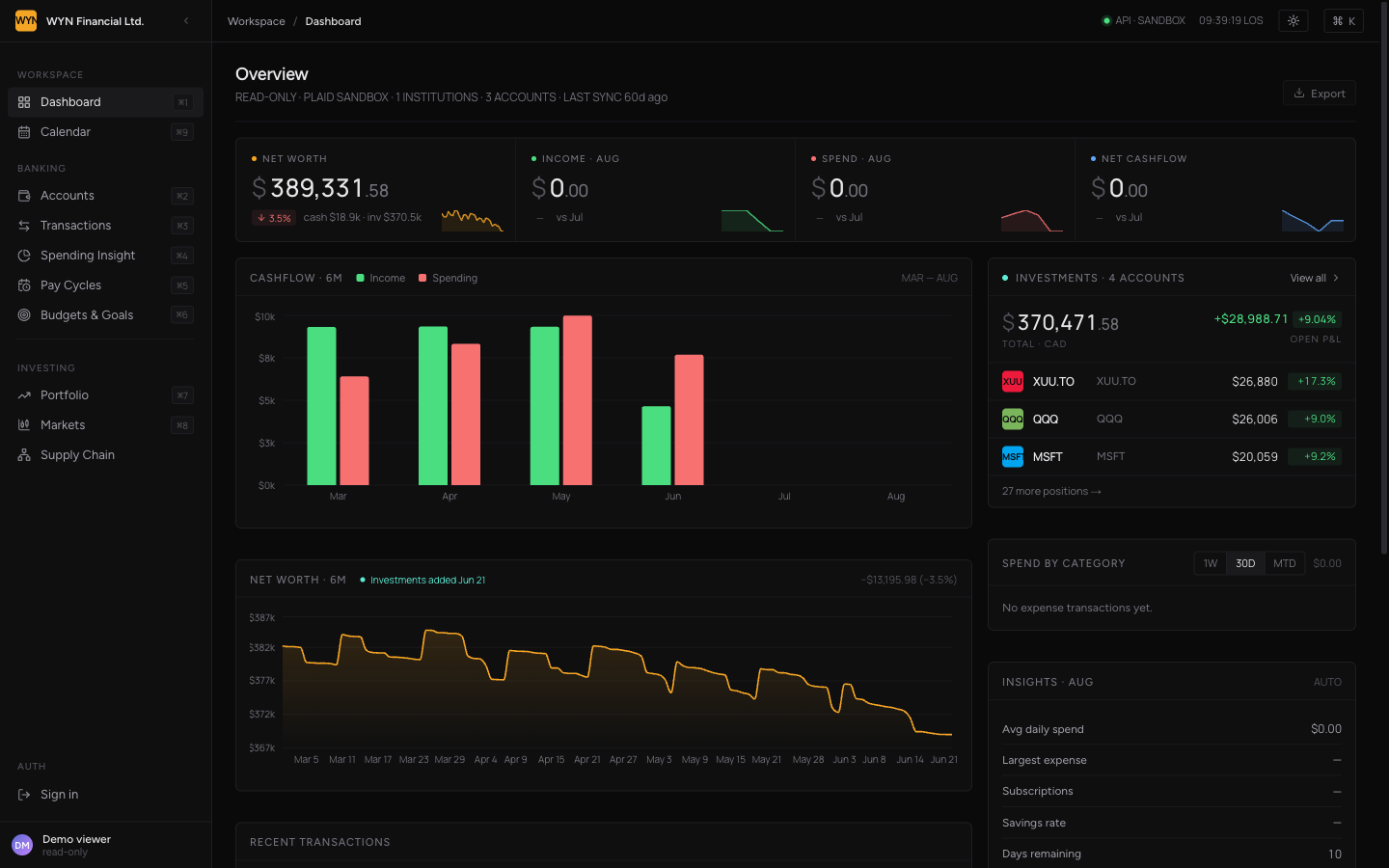
The dashboard loads all your financial data in one view: net worth at the top left, income and spending trends, a 6-month cashflow chart, investment holdings, category spending breakdown, and recent transactions. Everything updates every 6 hours when the sync jobs run.
What's Actually Running
Frontend Architecture:
- React 19 components on Next.js 16 App Router
- React Aria for accessible form controls (works with keyboard and screen readers)
- Recharts for clean, no-frills data visualizations
- next-themes for dark/light mode toggling (dark mode first, obviously)
- SCSS with colocated CSS Modules per component
Backend Architecture:
- Prisma 7 ORM with @prisma/adapter-pg for direct database connections
- PostgreSQL 16 with encrypted token storage (AES-256-GCM)
- Structured data model: transactions, accounts, pay cycles, recurring expenses, savings destinations, settlement patterns
- NextAuth.js 4 for GitHub OAuth with email allowlist
Data Pipeline:
- Plaid syncs every 6 hours via Vercel cron jobs
- SnapTrade syncs every 6 hours via Vercel cron jobs
- Webhooks from Plaid for real-time transaction updates (ES256 JWT verified)
- Careful transaction handling to prevent half-broken database states
- Sync audit logs for debugging failures
Security Measures:
- API endpoints require authentication (GitHub OAuth token or session)
- Sync triggers require bearer token (CRON_SECRET)
- Plaid webhooks verified with JWT signatures
- Access tokens encrypted at rest with AES-256-GCM
- SnapTrade user secrets encrypted in database
- No sensitive data ever reaches the frontend unencrypted
- Rate limiting on auth endpoints
The Performance Saga
The dashboard was snappy with six months of data. Then eight months. Then twelve. Then it wasn't snappy anymore. At some point I had to actually care about performance instead of just throwing it on the backlog.
The fix wasn't some fancy new technology. It was just better queries:
What Worked:
- Stopped summing transactions on every dashboard load - cache those results and refresh on change
- Materialized expensive calculations instead of computing them on the fly
- Added strategic database indexes (way more than you'd initially think)
- Implemented per-route query optimization
- Hooked up Vercel Speed Insights to measure what's actually slow
- Used Next.js streaming for Suspense boundaries to show partial content faster
The Numbers:
- Dashboard load went from 2-3 seconds to under 500ms
- Transactions page load dropped from 1.5s to 300ms
- Cycle calculations went from computed-on-request to cached-and-refreshed
- Added 7 targeted database indexes across the critical paths
Performance optimization is boring and unglamorous, but it's the difference between "kinda works" and "actually useful."
Before vs After
| Aspect | Before This Project | After Building |
|---|---|---|
| Apps to Check | 3-5 different apps | 1 unified dashboard |
| Data Location | Scattered across vendors | Your own PostgreSQL |
| Data Privacy | Used by third parties | Encrypted, only you see it |
| Account View | Manual checking each app | Real-time aggregated view |
| Investment Tracking | Multiple brokerages, no sync | All positions in one view |
| Spending Analysis | Maybe in one app | Category drilldown across all banks |
| Paycheck Planning | Guesswork | Cycles with recurring expense tracking |
| Setup Complexity | Sign up for each service | One-time local setup |
| Update Frequency | Manual | Every 6 hours automated |
Design and Styling
The visual inspiration came from Bloomberg Terminal and Linear. That combo sounds weird but it actually works:
- Bloomberg Terminal: Dense, information-rich, everything organized and findable
- Linear: Clean, purposeful, nothing gets in your way
Design System:
- SCSS with design tokens for colors, spacing, typography, and component behaviors
- CSS Modules colocated with React components (no global stylesheet mess)
- Design tokens for consistent theming across light and dark modes
- Responsive breakpoints for mobile (< 760px), tablet (761-960px), desktop (> 960px)
- Dark mode built first (nighttime developer bias), light mode added for daytime users
Theme Support:
- Full dark/light mode support via next-themes
- Automatic theme detection based on system preference
- Smooth transitions between modes
- All charts, tables, and components support both themes
- Dark mode makes sense for financial data dashboards (Bloomberg Terminal precedent)
Responsive Design:
- Started desktop-first (oops)
- Mobile-first redesign happened gradually as more features landed
- Tablet-specific layouts for 7-10" screens
- Table rows collapse to 2-line stacked layout on mobile
- Navigation becomes hamburger menu on small screens
- Touch-friendly interaction targets
Getting It Into Production
Hosted Deployment (Vercel)
Why Vercel:
- Cron jobs configured in vercel.json (no additional job scheduler needed)
- Database migrations run automatically during builds
- Zero-downtime deployments
- Built-in Speed Insights integration
- Scales down to essentially free for low traffic
Production Setup:
- GitHub connected for automatic deploys on push
- Plaid sync runs every 6 hours (0:00 UTC)
- SnapTrade sync runs every 6 hours (0:30 UTC)
- Database: Managed PostgreSQL instance (not included, bring your own)
- Environment variables loaded from Vercel secrets UI
Local Development
Quick Start:
npm install
cp .env.example .env
npm run secrets              # Generate encryption keys
npm run dev:db              # Start Docker PostgreSQL
npm run db:deploy           # Run migrations
npm run db:seed             # Seed demo data
npm run dev                 # Start Next.js dev server
Required API Keys (all free tier):
- Plaid - Banking data (sandbox or production)
- SnapTrade - Investment data
- GitHub - OAuth authentication
- TwelveData - Market data (optional)
Local Demo: Visit finance-demo.ionwyn.com to see the app in action without needing your own credentials. It's read-only and seeded with mock data, perfect for exploring the interface.
Where We Are Now
By The Numbers:
- 428 commits across the development history
- 400+ commits on the main branch
- 9+ pages in the core application
- 6 major feature areas (dashboard, transactions, spending, cycles, portfolio, supply chain)
- 24/7 sync with Plaid and SnapTrade (every 6 hours, automated)
- 2 theme modes (dark first, light for the day crew)
- Mobile-responsive across all breakpoints
What It Does
✓ Dashboard - Real-time net worth, cashflow trends, spending overview, investment summary
✓ Transactions - Searchable, filterable by date/category/account, CSV export support
✓ Spending Analysis - MTD/YTD category breakdowns with drill-down capability
✓ Pay Cycles - Biweekly planning with recurring expense accruals and safe-to-sweep suggestions
✓ Portfolio Tracking - Multi-brokerage view with allocation, performance, and P&L
✓ Supply Chain Intelligence - SEC filing analysis showing portfolio risks
✓ Market Data - Real-time prices, technical indicators, macro data
✓ Offline AI - Local Ollama assistant for financial questions
✓ Dark/Light Modes - Full theme support with automatic system detection
✓ Mobile-Responsive - Works on phones, tablets, and desktops
The Philosophy
The core principle is simple: your financial data is yours.
- It doesn't get sold to data brokers
- It doesn't get run through algorithms to predict your behavior
- It sits in your own database, encrypted at rest
- Only you can see it
- Everything is built on open standards
- You can export everything and move it tomorrow if you want
- You're never trapped by vendor lock-in
Why The Tech Choices Work
The stack is deliberately boring:
- Next.js + React - Proven, stable, thousands of people use it
- PostgreSQL - Rock solid, runs everywhere, doesn't need replacement
- Plaid + SnapTrade - Industry standard integrations
- TypeScript - Catches bugs before production
None of these are flashy or trendy. They all just work when you need them to. Performance is solid because it was treated as a real constraint from day one, not something to optimize later. Security matters because the consequences of messing it up are more than academic.
Key Lessons Learned
1. Use Tools You Already Know
Learning new tech is cool but slows you down. Next.js and PostgreSQL aren't exciting, but knowing them inside-out let me focus on the actual problem instead of fighting the framework.
2. Security is Not Negotiable for Financial Data
Once you're handling money, half-measures don't work. Encryption at rest, verified webhooks, rate limiting, and authentication aren't "nice to haves" anymore. They're table stakes.
3. Real Features Beat Flashy UI
A clean but boring interface that shows you what you actually need to know beats a pretty interface that requires three taps to get there. Bloomberg Terminal proved this decades ago.
4. Performance Matters from Day One
Optimizing performance after the fact is painful. It's way easier to avoid the bad query patterns from the start. That said, some optimization is inevitable as data grows.
5. Dark Mode First, Light Mode Second
If you're building financial software, dark mode should be the default. Your users are probably checking it at all hours, and burning their retinas isn't the vibe.
6. Your Boring Tech Stack Will Outlive Trendy Alternatives
TypeScript, PostgreSQL, React, and Next.js have been around for years and will be around for years more. Picking "boring but proven" is the opposite of a boring choice.
I built this because I was tired of opening different apps. I ended up learning more about how financial software actually works than I ever expected to. That part turned out better than planned.
I still use it every single day.